GlowC is a central device that relays commands from tablets or similar devices to GlowR units installed on the field.
Multiple GlowC units can be used simultaneously, allowing different applications to operate the GlowR units on the field at the same time.
GlowC supports both Normal Mode and Long-Range Mode.
To use Long-Range Mode, all GlowR, GlowC, and repeater units must be set to Long-Range Mode.
Normal Mode and Long-Range Mode cannot be mixed within the same system.
While Long-Range Mode extends the communication range up to 1 km, it reduces the communication speed by half to 250 kbps and introduces latency.
Please select the appropriate mode based on your specific requirements.
Mode switching
If you turn on the power normally, it will start up in standard mode.
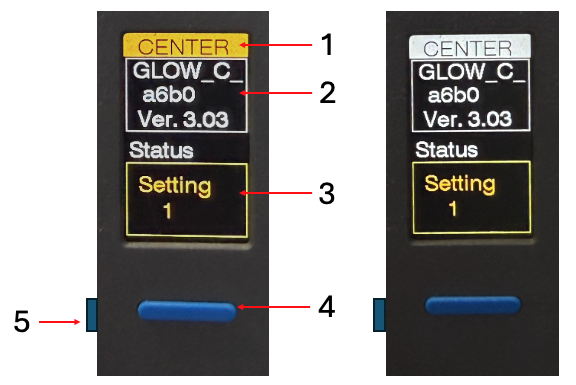
In standard mode, the background color of the title at the top is white.
If you turn on the power while pressing the front button located below the LCD, it will enter long-range mode.
Keep the button pressed while turning on the power, and release it once “LONG RANGE MODE” appears on the display.
When it switches to long-range mode, the title background color changes to orange.
Please verify that the title background color has turned orange on all connected GlowC, GlowR, and repeater units.
Explanation of the display
Title Screen – The background color is white in Normal Mode and orange in Long-Range Mode.
Device ID – Displays the device’s ID; used when connecting to the iPad app or web app.
Status Display – Shows the current status.
Front Button – Used to switch to Long-Range Mode or to test-illuminate the Glow R.
Power Switch – Turns the power on and off. For the orange M5StickC Plus2, press and hold this button to toggle the power. For the gray M5StickS3, press once to turn the power on and press twice to turn it off.
How to use
Connect the battery to the USB-C port and power on the device in either Standard Mode or Long-Range Mode.
All GlowR, GlowC, and Repeater units used in the same group must be set to the same mode.
Ensure that the title background color is consistent (either white or orange) across all units.
Connect the GlowC to the iPad app or web app.
Please refer to the respective manuals for instructions on using the iPad app or web app.
Press the button on the GlowR’s LCD display in the order the units will be arranged (e.g., along a track).
The device is registered to the GlowC, and the assigned device number appears on the GlowR’s LCD.
Perform this registration process for all GlowR units.
Once registration is complete, press the front button on the GlowC and verify that all GlowR units light up correctly.
Place the units along the track (or similar area) in the order of the device numbers shown on the rear LCDs.